|
|
 |
|
|
 |
|
|
 |
|
DownloadStudio - Features
DownloadStudio is the fastest download manager on the planet. It can download all your files, movies, music, programs,
games, flash video, photos, TV shows, documents, RSS feeds, blogs, podcasts, complete web sites, complete
FTP sites and much more!
DownloadStudio contains 12 specialized downloading tools to help you download all the files you want. It works with all the
latest web browsers, including Google Chrome, Firefox and Internet Explorer. DownloadStudio runs on 32-bit and 64-bit
versions of Windows 10, Windows 8, Windows 7, Windows Vista and Windows XP.
 |
Don't just take our word for it. DownloadStudio won PC Magazine Editors'
Choice Award! PC Magazine tested and reviewed
all leading download managers in its 12th
Annual Utility Guide, and awarded DownloadStudio
the Editors' Choice for best Internet Download
Manager.
|
|

Version: 10.0.4.0
Price: $24.95
SPECIAL OFFER! SAVE 40% TODAY
Price: $14.97
|
File Downloader
 DownloadStudio is the fastest download manager on the planet!
Advanced downloading techniques mean DownloadStudio is up to 5 times
faster than web browsers and up to 50% faster than other download
managers.
DownloadStudio is the fastest download manager on the planet!
Advanced downloading techniques mean DownloadStudio is up to 5 times
faster than web browsers and up to 50% faster than other download
managers.
Resume broken or failed downloads so you'll never lose a download again.
Download multiple files simultaneously.
Schedule downloads for off-peak periods, overnight or any time of day.
Supports all popular internet protocols, including HTTP, HTTPS,
RTSP, MMS, RSS, FTP, RDF and ATOM.
|

|
Video Downloader
DownloadStudio lets you download all your favorite videos (FLV. MP4, etc.) from popular video sites such as Youtube,
Youku, Google Video, Dailymotion, Vimeo, Crackle and many more. For more supported sites, see Supported Sites.

URL Sniffer
DownloadStudio contains a specialized URL sniffing application called DownloadStudio
URL Sniffer. Some URLs (web addresses) can be very difficult to find - especially for video and music playing
in your media player or web browser. DownloadStudio has solved this problem with DownloadStudio URL Sniffer.
DownloadStudio URL Sniffer looks for URLs in your internet traffic. Once URLs are found, they are listed for you to
select and download using DownloadStudio.
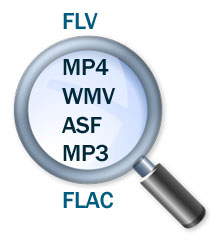
DownloadStudio URL Sniffer will find video URLs, music URLs, photo URLs and more.
|
|
Streaming Audio/Video Downloader
Downloading streaming audio and streaming video is a must-have feature when choosing
a download manager. Streaming audio and streaming video is not like a typical file
on the internet that you can download and save onto your computer. It is streamed
to your computer, played in your media player and then discarded.
DownloadStudio can connect to, download and save streaming audio and streaming video
directly from Windows streaming media servers - even live broadcasts! This lets you
keep your favorite music, movies, video clips and TV shows on your computer and play them without being
connected to the internet. Formats include ASF, WMV, WMA, ASX, WVX, WAX and WSX.
DownloadStudio can also download internet radio from SHOUTcast servers.
Simply enter the URL for the broadcast and DownloadStudio will start downloading it.
File Range Downloader
DownloadStudio lets you download a range of files so you can quickly and conveniently
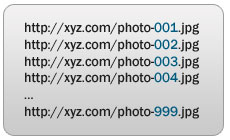
get a collection of files that you want. Web sites often use file-naming conventions
whereby their content is named using a series of numbers or letters. For example, a celebrity
photo gallery site may name its "Angelina Jolie" photos as jolie001.jpg, jolie002.jpg,
jolie003.jpg & jolie125.jpg. You can see that they are a series of photos numbered from 1 to
125.
Rather than the tedious job of downloading each photo separately, DownloadStudio's File
Range Downloader lets you get all these files in one step. Simply enter the URL
for one of the photos and specify the file range for the download. DownloadStudio that
can download collections of files from photo gallery sites, music sites, video sites
and more.
|
|
Web Site Downloader
DownloadStudio lets you download a complete web site, or to download just certain files that match
your criteria from a web site.
Downloading a complete web site allows you to view the web site offline without being connected to the internet.
All files for the web site are downloaded and the site is fully functional. This is great for offline browsing,
for research purposes and for making regular backups of a web site.
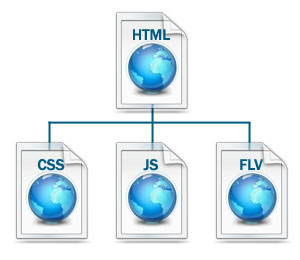
Downloading specific files from a web site is a very convenient way to the files that you want. For example,
using DownloadStudio, you can download all the large-sized photos from a photo gallery. Using DownloadStudio, you can:
- get all flash video
from a web site
- get all photos from
a web site
- get all music from a
web site
- get all video from a
web site
- get all documents from
a web site
- get all programs from
a web site
Only DownloadStudio lets you specify the exact criteria to get specific files from a web site.
|
|
DownloadStudio works with all popular web browsers!
DownloadStudio integrates with the latest versions of all popular web browsers:
- Google Chrome
- Firefox
- Internet Explorer
Web browser downloads go directly to DownloadStudio for ultra-fast downloading. Right-click menus give
you quick access to DownloadStudio features. Web browser configuration is fully customizable so you can browse and download
the way you want to.
|
|
Site Rules
DownloadStudio includes Site Rules that let you specify how to download from particular web sites. For example:
- Some web sites may not allow mulitple connections or downloads.
- Some web sites may not allow accelerated downloading using DownloadStudiio's split technology.
- Some sites may require password access to download files.
- Some web sites may require a proxy server.
DownloadStudio will use these Site Rules whenever you download from web sites so all files download successfully.
Audio/Video Capture
DownloadStudio contains
a specialized audio and
video recorder application
called DownloadStudio
Audio/Video Capture.
It lets you capture any
audio or video as it plays
on your computer in your
media player or web browser.
This lets you save any audio
or video from any web site
onto your computer.
DownloadStudio Audio/Video
can record any audio and
video formats - including
streaming audio or video
from Windows, Real and QuickTime
streaming servers.
RSS Feed, Blog and
Podcast Downloader
DownloadStudio lets you
subscribe to and download
RSS feeds, podcasts and
blogs. Most web sites and
blogs include RSS feeds
for visitors to keep up-to-date.
Podcasts are a very popular
way to listen to the latest
music or watch the latest
videos.
Using DownloadStudio, you
can view all the content
from your favorite feeds,
or download all the links
within a feed so you can
read the content offline
without being connected
to the internet.
DownloadStudio can download
podcasts including all the
music files or video files
in the podcast. This lets
you play them on your computer
or transfer them to your
portable media player, such
as an Apple iPod, Sony PSP
or Microsoft Zune.
|

|
Post Processing Actions
After you download certain
types of files, you always
need to do extra tasks to
get the file that you want.
This can be tedious and
time consuming. For example:
- After downloading a
compressed file (.ZIP,
.RAR, etc.), you need
to extract the files from
it.
- After downloading a
Flash video (.FLV) file,
you want to convert it
to a format that you play
in your media player (e.g.
AVI, M4V, MPEG-2).
- After downloading a
set of multi-part files
(.001, .002, .003, etc.),
you need to combine them
into one file.
- After downloading a
movie, you want to add
it to Mezzmo for DLNA
streaming in your home.
All these tasks are completed
automatically in DownloadStudio
using Post Processing Actions.
Post Processing Actions
can be configured by you.
You can choose any program
on your computer that you
want to run - for example
WinZip or WinRAR. DownloadStudio
knows about many popular
applications - such as Mezzmo,
WinZip, 7-Zip, and
WinRAR. If you have any
of these programs installed,
then Post Processing Actions
will be automatically installed
and run when you download
a matching file.
Sync downloaded files to the Cloud
If you use cloud storage to store your files, then you can get DownloadStudio to automatically download files into your cloud folder on
your computer so they are synced to your cloud storage account. All popular cloud providers supported.

Site Explorer
DownloadStudio's Site Explorer
is like a web browser except
that it lists all the images,
flash and links on a web
page. This is very handy
when you are having troubles
finding the files that you
want to download from a
web site or FTP site. Once
listed, simply choose the
files you want to download
and DownloadStudio will
use File Downloader to get
them.
ZIP Preview
DownloadStudio lets you preview the contents of ZIP files on web sites. This lets you select the files inside the ZIP file
that you wish to download. DownloadStudio will extract just the selected files and download them for you.
|

|
RSS Feed Reader
Once you have downloaded
your favorite RSS feeds,
blogs or podcasts using
DownloadStudio, you can
view them with DownloadStudio's
RSS Feed/Podcast Reader.
The RSS Feed Reader lets
you view all your feeds,
check for updates to feeds,
subscribe to new feeds and
more.
System Requirements
Windows 10 (64-bit and 32-bit), Windows 8 (64-bit or 32-bit), Windows 7 (64-bit or 32-bit), Windows Vista (64-bit or 32-bit), Windows XP (64-bit or 32-bit) |
Minimum of 512MB RAM |
Minimum of 50MB free
hard disk space |
Minimum of 1024x768,
24 bit resolution
display |
Internet connection |
Languages: English, French, Spanish, Russian, Polish, Ukraine, Czech |
|
|
|
|
|
|




